License and Data
Analytics
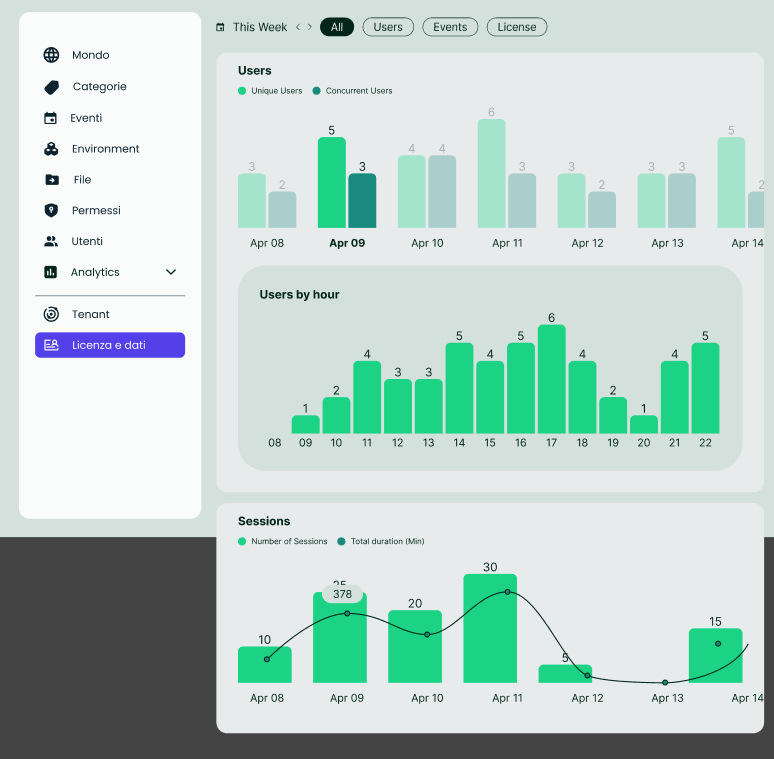
The Analytics section displays visual insights into user activity:
- Daily Users: A graph showing the number of unique and concurrent users each day within a selected week.
- Hourly Users: By selecting a specific day, the Tenant Manager can view user activity by hour to identify peak usage times.
- Sessions: A chart displaying the number of sessions and the total duration of user activity for each day, helping monitor engagement trends. The License and Data section in the Back Office provides the Tenant Manager with essential information regarding the status of the tenant's license, resource usage, and user analytics. This section enables administrators to monitor license limitations, data usage, and user engagement trends to optimize platform management.
License Status
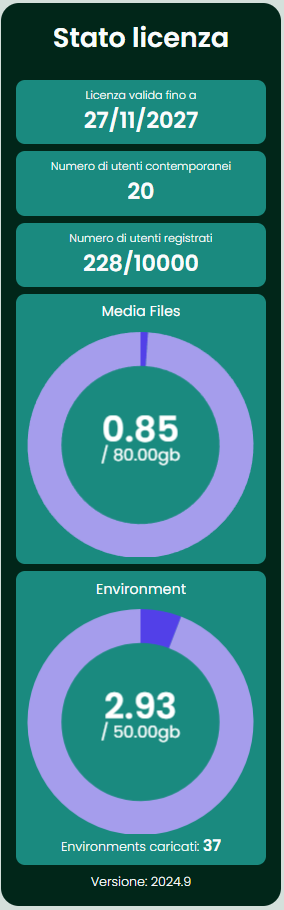
This section displays key details about the license:
- License Expiration Date: Indicates the date when the license will expire, allowing the Tenant Manager to plan renewals accordingly.
- Concurrent User Limit: Shows the maximum number of users allowed to be active simultaneously on the platform.
- Registered User Limit: Shows the number of current users regirested on the platform.
Data Usage
The Data Usage area provides information on resource consumption within the tenant:
- Media Files Usage: Displays the amount of GB used for uploading assets, such as media files, out of the total available storage capacity.
- Environments Usage: Shows the number of environments uploaded and the space occupied, out of the allotted storage limit for environments.
Product Version
At the bottom of this section, the Product Version Number is displayed, indicating the current version of the platform in use.
The License and Data section helps the Tenant Manager stay informed about the license status, resource usage, and user engagement patterns, enabling better planning for storage, user capacity, and platform optimization.